

Introduction
MCP tool calls typically timeout after 10 seconds, making long-running operations challenging. MCP Hive’s Progress Updates feature enables OpenAPI-based tools to send real-time progress updates to MCP clients through a webhook system, extending operation timeouts indefinitely.How It Works
MCP Hive provides a webhook-based progress update system that bridges OpenAPI endpoints with MCP clients: Key Benefits:- Seamless Integration: No changes needed to MCP clients
- Rich Progress Updates: Send structured data, artifacts, and real-time status
- Extended Capabilities: Support for chunked artifacts and multiple content types
- Simple Implementation: Just enable async mode and handle webhook calls
Getting Started
Step 1: Enable Async Mode
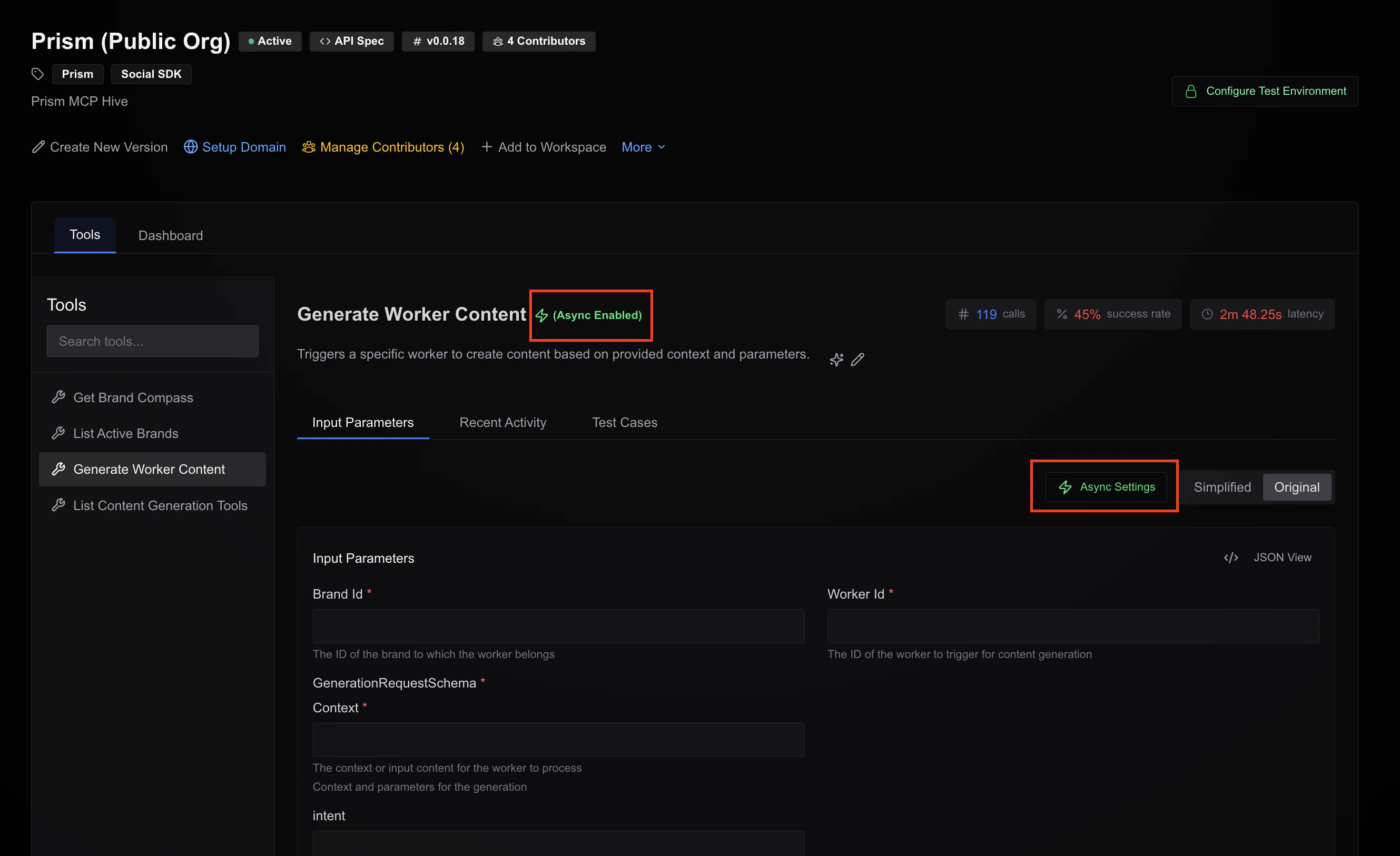
In Hive Studio, enable async mode for tools that need progress updates:- Navigate to your hive studio page
- Select the tool you want to enable for long-running operations
- Click on
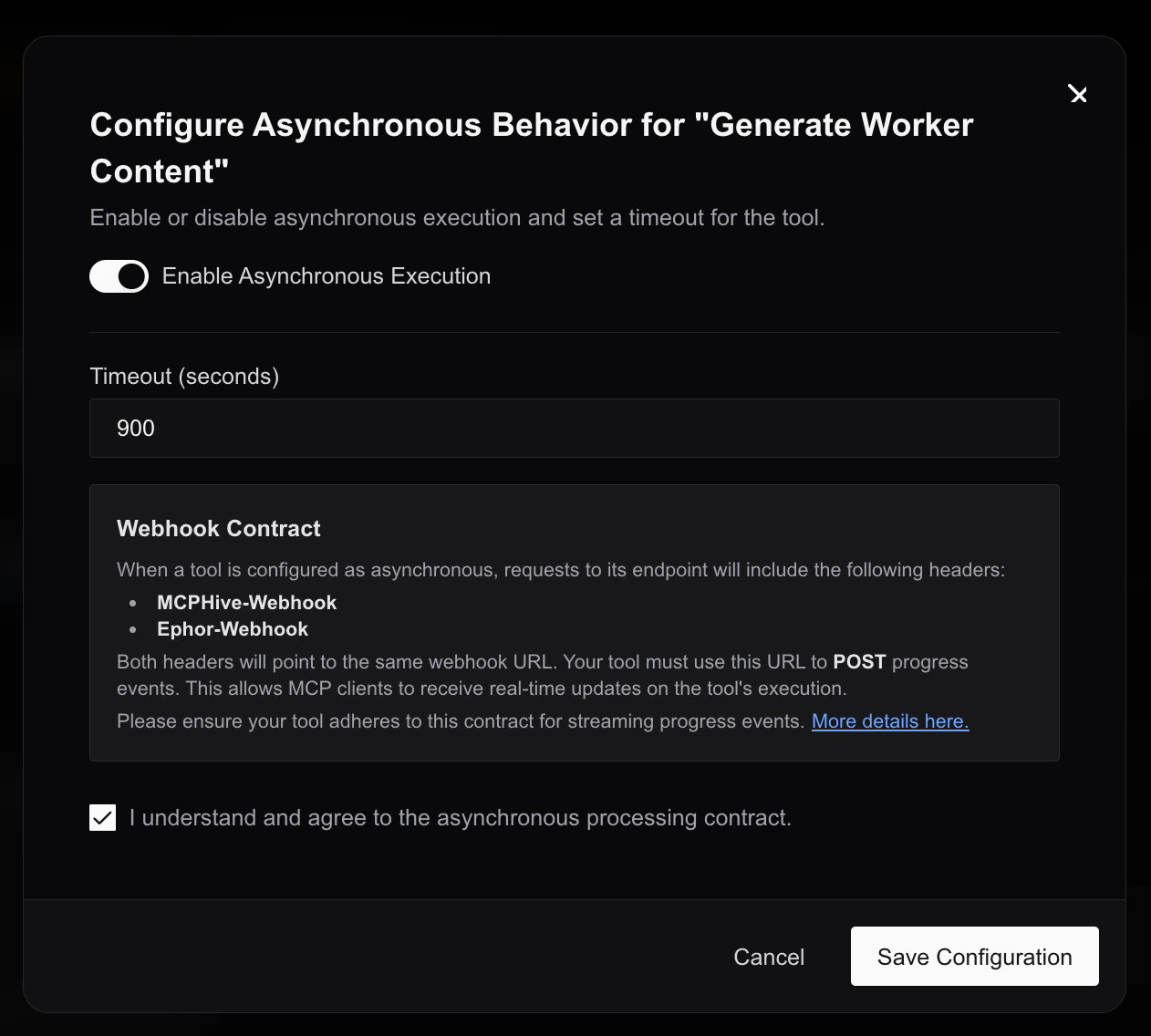
Async Settingsbutton - Toggle
Enable Async Mode - Configure timeout settings
- Save the configuration
Step 2: Access the Webhook URL
When async mode is enabled, MCP Hive automatically injects theMCPHive-Webhook header in requests to your API endpoint:
Step 3: Send Progress Updates
Post progress events to the webhook URL as your operation progresses.Event Types
MCP Hive supports two primary event types for progress updates:1. TaskStatusUpdateEvent
Purpose: Send current processing status and progress information to keep users informed about ongoing operations. When to use:- To provide regular progress updates during long-running operations
- To send status messages explaining what’s currently happening
- To indicate completion, failure, or cancellation of tasks
- Required: Must send a final status event to mark task completion
state set to one of: completed, cancelled, failed, or rejected.
Use this for general progress updates during task execution:
2. TaskArtifactUpdateEvent
Purpose: Send actual results, data, or files generated by your long-running operation. When to use:- To deliver the final results of your operation
- To stream large results in smaller chunks for better performance
- To send multiple types of content (text, structured data, files)
- Single Result: Set
append: falseandlastChunk: true - Multiple Chunks:
- First chunk:
append: false,lastChunk: false - Middle chunks:
append: true,lastChunk: false - Final chunk:
append: true,lastChunk: true
- First chunk:
Complete Event Flow Example
Here’s how to properly combine both event types:Implementation Examples
Python Implementation
Node.js Implementation
Advanced Features
Artifact Streaming
For large artifacts, you can stream content in chunks:Rich Content Types
Send different types of content in your artifacts:Best Practices
Update Frequency
- Send updates every 5-10% of progress for long operations
- Avoid overwhelming users with too-frequent updates (minimum 2-3 second intervals)
- Always send a final event with
final: true
User Experience
- Include estimated completion times when possible
- Use consistent, clear messaging
- Provide meaningful progress indicators (percentages, steps completed)
- Send interim results for very long operations
Error Handling
- Always send a final status update on errors with
state: "failed" - Include error details in metadata for debugging
- Implement retry logic for webhook failures with exponential backoff
Performance
- Set reasonable timeouts for webhook requests (30 seconds recommended)
- Handle webhook failures gracefully
- Consider local buffering for critical updates
Troubleshooting
Common Issues
Webhook URL not received- Ensure async mode is enabled for your tool in Hive Studio
- Check that your endpoint is correctly reading the
MCPHive-Webhookheader
- Verify webhook URL is being called with correct event structure
- Check that
Content-Type: application/jsonheader is set - Ensure final event has
final: true
- Send at least one update every 30 seconds to prevent timeout
- Check network connectivity to webhook endpoint
- Verify webhook endpoint is responding with 200 status
Debugging Tips
- Log all webhook requests and responses
- Test webhook URL manually with curl or Postman
- Monitor your application logs for error patterns
- Use the exact event schemas provided in this documentation
FAQ
Q: Can I use progress updates with existing tools? A: Yes, simply enable async mode for existing tools in Hive Studio and update your endpoint to handle the webhook. Q: What happens if my webhook request fails? A: Implement retry logic with exponential backoff. MCP Hive will handle timeout extensions based on successful webhook deliveries. Q: Can I send binary files in artifacts? A: Yes, use Base64 encoding in thedata field or provide a uri to the file location.
Q: How long can operations run?
A: For the duration set in the async settings. MCP client may close the connection if no updates are received within 10 seconds interval.
Q: Can I update the same artifact multiple times?
A: Yes, use append: true to add content to existing artifacts or append: false to replace them.