> ## Documentation Index
> Fetch the complete documentation index at: https://docs.ti.trilogy.com/llms.txt
> Use this file to discover all available pages before exploring further.
# Troubleshooting
> Solving common issues when creating and managing hives
# Troubleshooting Guide for Hive Creators
This guide helps you resolve common issues encountered when creating and testing hives.
## Quick Issue Navigator
| Issue Type | Common Symptoms | Go to Section |
| ----------------------- | ----------------------------------------- | ----------------------------------------------------- |
| 🔍 **Input Validation** | Invalid input, parameter type mismatches | [Validation Errors](#validation-errors) |
| 🔒 **Authentication** | "Unauthorized" errors, auth failures | [Authorization Errors](#authorization-errors) |
| ⏱️ **Timeout** | Tool execution cuts off, connection drops | [Timeout Errors](#timeout-errors) |
| 🔌 **Connection** | Can't connect, connection drops | [Connection Issues](#connection-issues) |
| 🛠️ **Tool Invocation** | Tool not recognized or improperly used | [Tool Invocation Problems](#tool-invocation-problems) |
## Validation Errors
If you're invoking a tool but getting validation errors:
### Check Input Parameters
* Verify that inputs match the expected parameter types and structure
* Ensure all required parameters are being passed
* If using simplified schema (through Studio), check the transformation script's logic
### Be Aware of Type Conversions
The MCP SDK automatically converts input values to the closest type:
* `{"team_id": "539"}` will convert to `{"team_id": 539}` (integer)
* `"true"` gets converted to `True` (boolean)
This happens because the SDK runs `json.loads()` on passed values before sending them to the tool. Handle these conversions appropriately in your backend.
## Authorization Errors
When encountering authorization errors in Hive Studio:
1. Verify your hive uses one of our [supported authentication methods](/products/mcp-hive/creators/best-practices#authentication)
2. Check that your test environment is configured correctly if you are testing tools through Studio
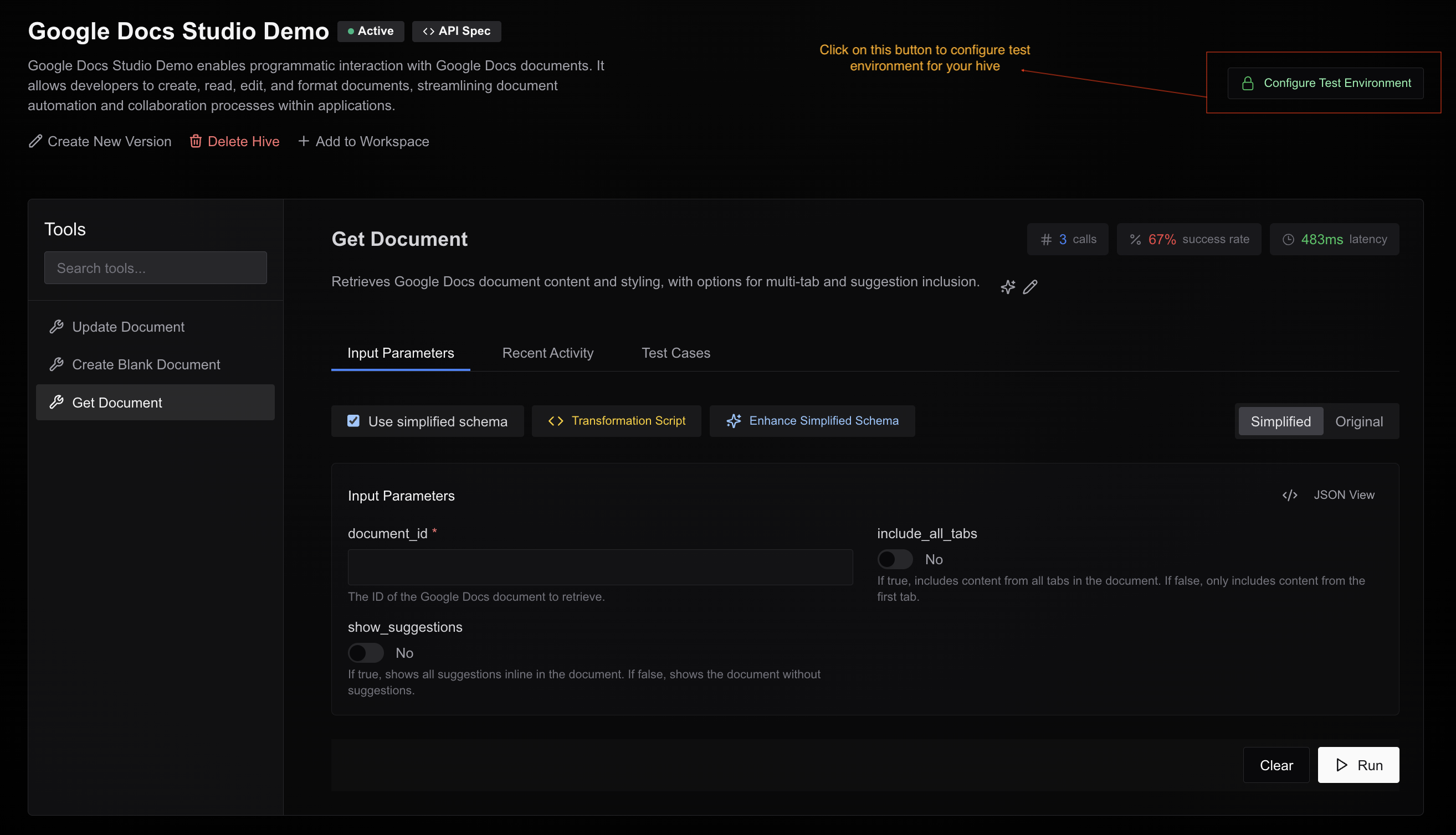 3. Ensure credentials are valid and have appropriate permissions
For OAuth2, ensure your API spec has all the required scopes and you have selected them while configuring test environment.
4. We support OAuth2 for following providers:
* Google
* Slack
* Hubspot
* Sherlock
* Canva
If you are using some other provider or a custom provider, please reach out to us on [GChat](https://chat.google.com/room/AAAA-1lU1zM?cls=7) or mail us at [mandal.ashish@trilogy.com](mailto:mandal.ashish@trilogy.com).
## Timeout Errors
When testing with Claude Desktop, Cursor, or other clients:
* Most clients timeout tool calls after `10 seconds`
* Hive Studio doesn't have this limitation. You can test long-running tools through Studio without any issues.
* **Solution:** Optimize your tools to complete within `10 seconds` when possible
We're working on a progress update feature that will allow long-running tools to send progress updates, which should resolve these timeout issues.
## Connection Issues
### Connection Drops During Tool Execution
* This is expected behavior for long-running tools due to client timeouts
* **Solution:** Optimize tool execution time or wait for our upcoming progress update feature
* If you need to test again, restart the client (Claude) or refresh (Cursor)
### Unable to Connect to Hive
If a client cannot connect to your hive at all:
1. Test tools through Studio to verify the hive is functioning
2. If Studio tests work, the issue likely lies with the client (Claude/Cursor)
3. Try restarting the client or contact our support team at [GChat](https://chat.google.com/room/AAAA-1lU1zM?cls=7) or mail us at [mandal.ashish@trilogy.com](mailto:mandal.ashish@trilogy.com).
## Tool Invocation Problems
If clients struggle to invoke your tools:
1. Review tool descriptions for clarity and completeness
* Use AI assist in Studio to improve descriptions
2. Simplify parameter structures
* Cursor particularly struggles with deeply nested parameters
3. Test with multiple clients
* If Claude Desktop works but Cursor fails, the issue may be client-specific
* If both fail, revisit your tool design
## Getting Help
For issues you can't resolve, contact our support team:
* Email: [mandal.ashish@trilogy.com](mailto:mandal.ashish@trilogy.com)
* Support Group: [GChat](https://chat.google.com/room/AAAA-1lU1zM?cls=7)
3. Ensure credentials are valid and have appropriate permissions
For OAuth2, ensure your API spec has all the required scopes and you have selected them while configuring test environment.
4. We support OAuth2 for following providers:
* Google
* Slack
* Hubspot
* Sherlock
* Canva
If you are using some other provider or a custom provider, please reach out to us on [GChat](https://chat.google.com/room/AAAA-1lU1zM?cls=7) or mail us at [mandal.ashish@trilogy.com](mailto:mandal.ashish@trilogy.com).
## Timeout Errors
When testing with Claude Desktop, Cursor, or other clients:
* Most clients timeout tool calls after `10 seconds`
* Hive Studio doesn't have this limitation. You can test long-running tools through Studio without any issues.
* **Solution:** Optimize your tools to complete within `10 seconds` when possible
We're working on a progress update feature that will allow long-running tools to send progress updates, which should resolve these timeout issues.
## Connection Issues
### Connection Drops During Tool Execution
* This is expected behavior for long-running tools due to client timeouts
* **Solution:** Optimize tool execution time or wait for our upcoming progress update feature
* If you need to test again, restart the client (Claude) or refresh (Cursor)
### Unable to Connect to Hive
If a client cannot connect to your hive at all:
1. Test tools through Studio to verify the hive is functioning
2. If Studio tests work, the issue likely lies with the client (Claude/Cursor)
3. Try restarting the client or contact our support team at [GChat](https://chat.google.com/room/AAAA-1lU1zM?cls=7) or mail us at [mandal.ashish@trilogy.com](mailto:mandal.ashish@trilogy.com).
## Tool Invocation Problems
If clients struggle to invoke your tools:
1. Review tool descriptions for clarity and completeness
* Use AI assist in Studio to improve descriptions
2. Simplify parameter structures
* Cursor particularly struggles with deeply nested parameters
3. Test with multiple clients
* If Claude Desktop works but Cursor fails, the issue may be client-specific
* If both fail, revisit your tool design
## Getting Help
For issues you can't resolve, contact our support team:
* Email: [mandal.ashish@trilogy.com](mailto:mandal.ashish@trilogy.com)
* Support Group: [GChat](https://chat.google.com/room/AAAA-1lU1zM?cls=7)